
How to tighten your AI privacy settings
AI tools like ChatGPT, Claude, and Google Workspace have become a standard part of daily work. They help you write faster, think things through, and stay organised. But do you actually know what happens to your data by default?
Most tools are set up out of the box to learn as much as possible from how you use them. That sounds helpful, but in practice it means your conversations, ideas, and sometimes even your location are used to train their models. For personal use that is already worth thinking about; for business use, it is something you really want to address.
Good news: adjusting the settings takes just a few minutes per tool.
Why bother?
AI tools learn from what you put into them. If you are writing a client proposal, drafting a sensitive email, or processing financial information, that content can in some cases end up as training data. Most providers say they anonymise data, but the default setting is essentially "yes, use my data."
You do not need to be paranoid to want to turn this off. It is simply a sensible habit, like not leaving a meeting room unnecessarily unlocked.
ChatGPT: turn these off in Settings > Data controls
Go to your settings and click "Data controls." Turn off the following:
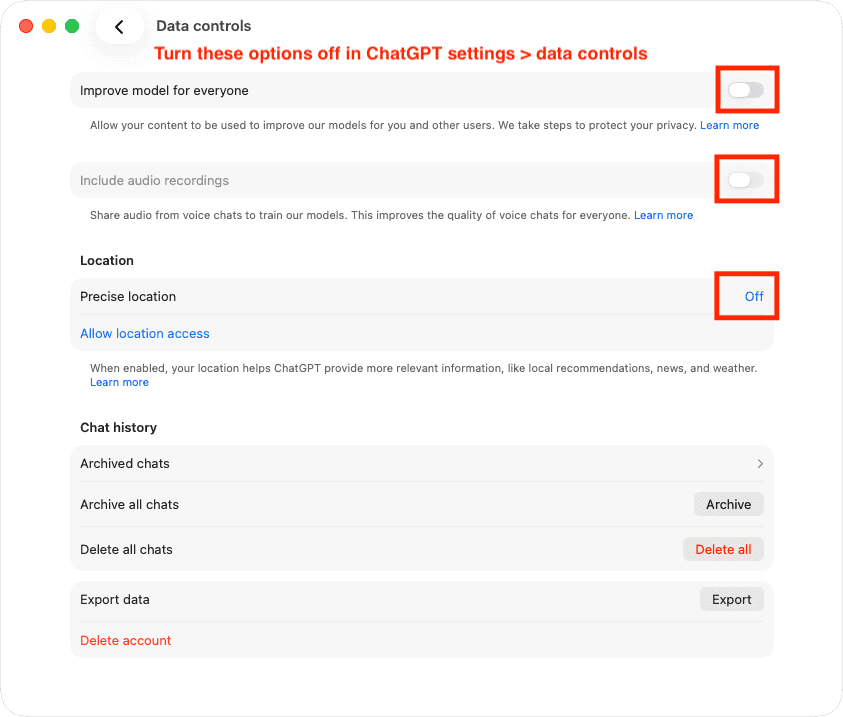
Improve model for everyone: this setting allows your conversations to be used to improve the model. Turning it off means your chats are no longer used as training data.
Include audio recordings: if you use the voice feature, recordings are shared by default. Turn this off if you do not want your audio included.
Precise location: ChatGPT requests access to your location for "more relevant answers," but for most users this adds very little. Just set it to "Off."
Claude: turn these off in Settings > Privacy
Open your Claude settings and go to the Privacy tab. You will find two settings to turn off:
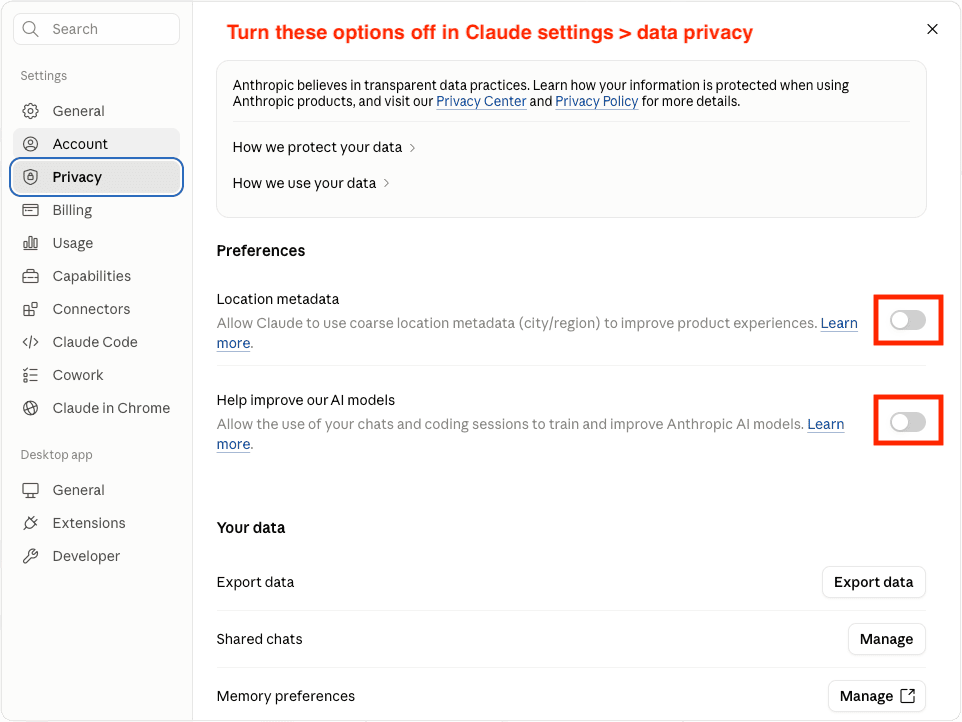
Location metadata: Claude can use your location (at city or region level) to improve product experiences. Not necessary.
Help improve our AI models: this covers the use of your chats and coding sessions as training data for Anthropic. Turn it off if you want your work to stay private.
Gmail and Google Workspace: smart, but not always welcome
Google's smart features are convenient, but they work by analysing your email content. For business accounts, it is worth taking a closer look.
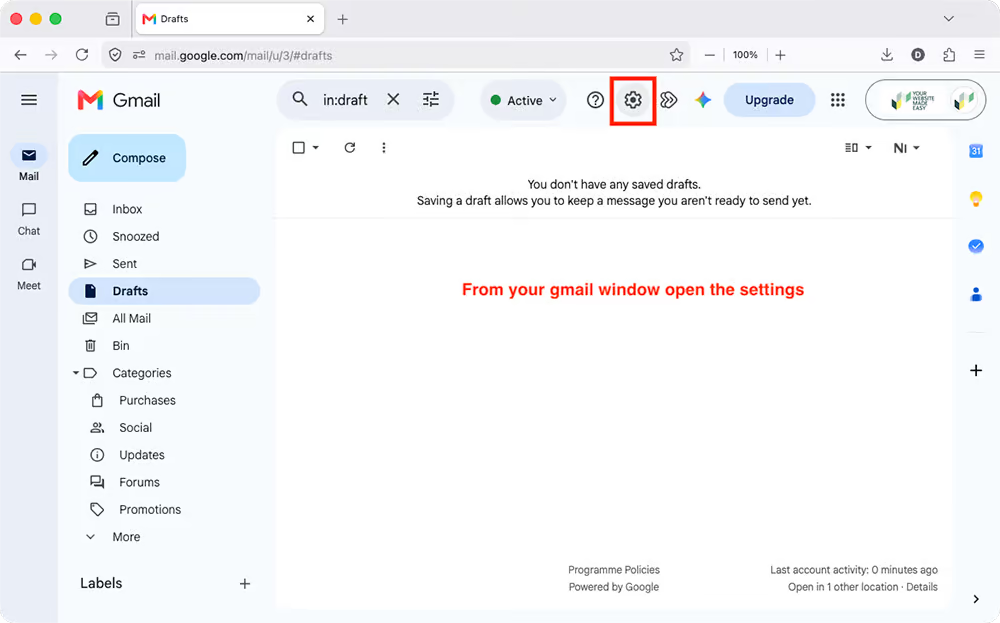
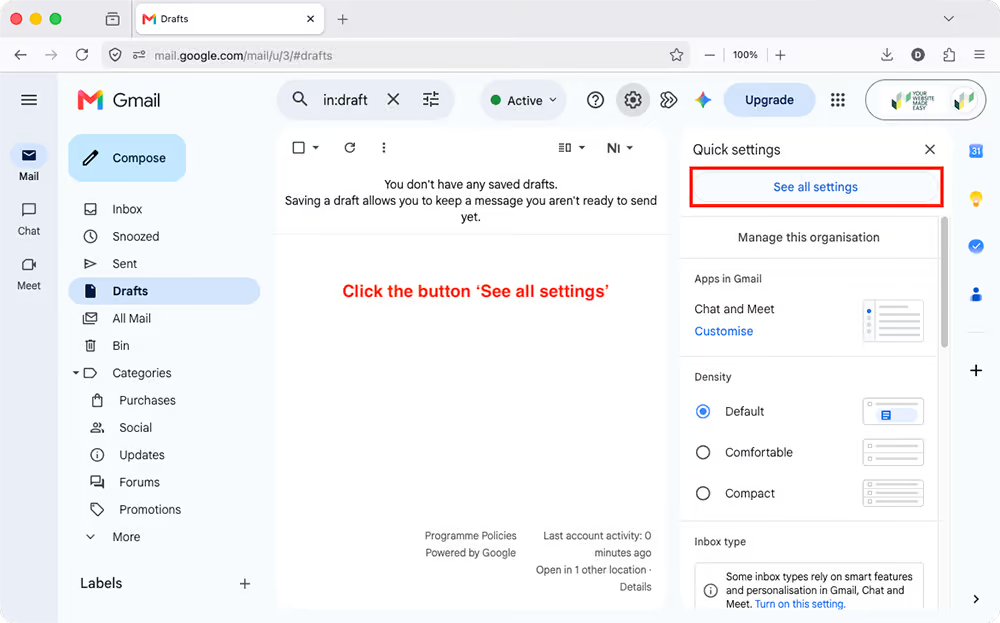
Step 1: open Gmail and click the gear icon in the top right. Then click "See all settings."
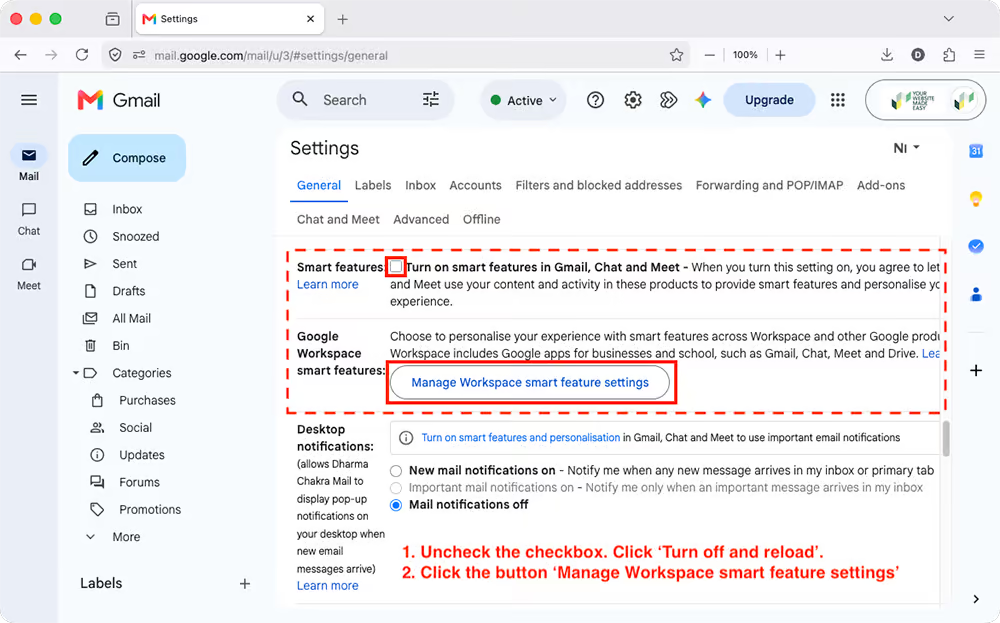
Step 2: go to the "General" tab and scroll to "Smart features." Uncheck the box for "Turn on smart features in Gmail, Chat and Meet." Click "Turn off and reload" if prompted.
Step 3: click "Manage Workspace smart feature settings." A pop-up appears with two toggles: "Smart features in Google Workspace" and "Smart features in other Google products." Turn both off and click "Save."
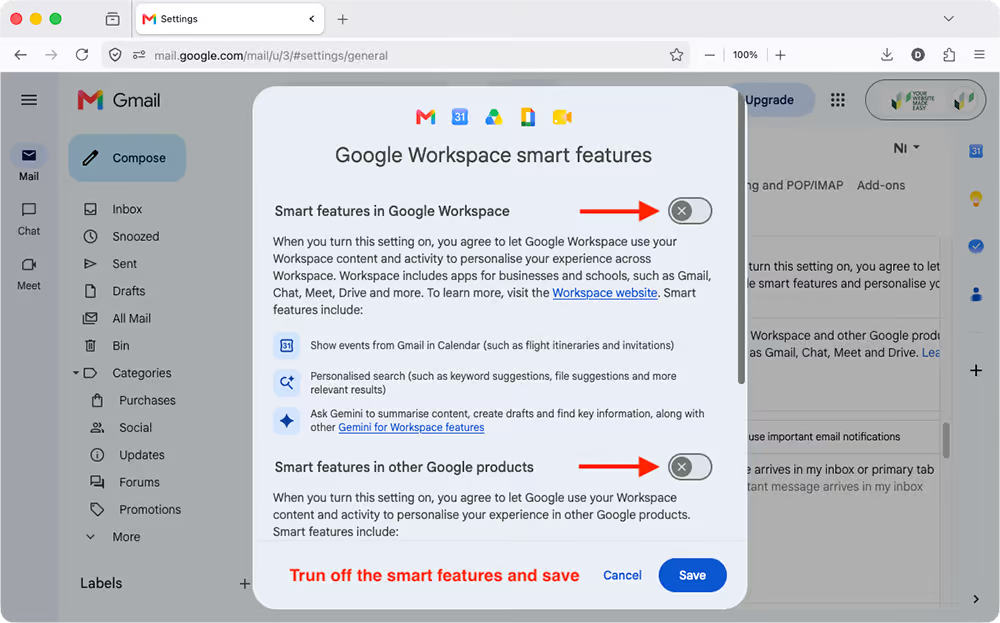
This prevents Google from using your email content to personalise your experience in other products, such as Gemini.
Ask your AI what it knows about you (and others)
Switching settings off is one thing. But whatever has already been saved simply stays put.
AI tools remember more and more. Handy, because you don't have to explain who you are and what you're working on every single time. But among all those handy things, there may be something you'd rather not have stored. An address from an email you asked it to rewrite. A client's phone number. A password you pasted in quickly, "because I'll tidy that up later".
That isn't only your data. It's also about the people you work with.
Luckily, you can just ask. Copy the prompt below and paste it into ChatGPT, Claude, Copilot or Gemini. It works in all four.
I want to check what sensitive information you have stored, about me and about other people. Think of clients, colleagues, family or friends I've mentioned in conversations. Look through everything you remember: your memory, saved information, custom instructions and any past conversations you can access.

Does any of it contain sensitive information, such as:
- addresses
- phone numbers
- national ID numbers, passport numbers or other identification numbers
- bank account or credit card numbers
- passwords, PINs or login codes
- API keys or tokens

For each item, tell me who it's about, what kind of information it is and where you stored it. Don't show the information in full, only the first few characters. If you find nothing, just say so.

Finally, tell me how I can delete this information.
See the result as a first check, not a guarantee. Your AI can't always see all your old conversations. So take a quick look at the memory settings yourself as well, and you'll know for sure it's clean.
Small effort, real impact
You only need to do this once. With ChatGPT and Claude, you lose nothing: both tools work exactly the same, just without your conversations being used for training.
Google is a slightly different story. Turning off smart features also disables a few convenient extras: predictive text as you type, quick reply suggestions, and the automatic creation of calendar events from emails. Core Gmail functionality stays intact, but it is worth knowing what you are trading.
It is a bit like agreeing to terms and conditions: most people click through automatically, but those who take a moment to read make better choices.
Do you care about your privacy? Then this is truly the minimum to get sorted. For your own sake, and for your clients.

 Nederlands
  English (UK)